The Statcast era in Major League Baseball has sparked alot of new research topics for baseball fans everywhere. From spin rate to release point and exit velocity to batted ball location, they are all available to researchers everywhere. This has allowed baseball to get better at player development and apply new strategies to today’s game which is fun to see.
Today, I will be using that Statcast data to try and predict the probability of a hit occurring on every single ball in play. I will be using R to conduct this analysis.
I will start by importing the packages I will need to conduct this analysis:
library(tidyverse)
library(tidymodels)
library(ROCR)
library(vip)
Next thing I will do is import the data that I will use:
pbp21_bat <- read.csv('pbp21_bat.csv')Data setup
newdat <- pbp21_bat %>%
  filter(!is.na(launch_speed) & bb_type != 'null')%>%
  select( player_name,
          game_date,
          game_pk,
          inning,
          release_speed,
          release_spin_rate,
          pfx_x,
          pfx_z,
          plate_x,
          plate_z,
          release_pos_x,
          release_pos_z,
          launch_speed,
          launch_angle,
          home_team,
          stand,
          bb_type,
          events,
          hc_x,
          hc_y,
          barrel) %>%
  na.omit() %>%
  fastDummies::dummy_cols(c('bb_type', 'home_team', 'stand'), remove_first_dummy = TRUE)
After we read in the data, we will use a filter to make sure we remove any rows where there is no ball in play. Then we select all the columns that we need for this model. After we select all the columns we we will remove all of the NA’s via the na.omit() function. Then we will create dummy variables using the dummy_cols()(function from the fastDummies package) for the bb_type and home_team columns. This will allow us to include batted ball type and the home ballpark within the model.
The one column we are missing is the target variable. Meaning, we need a column that will identify whether the ball in play was a hit or not. This will be the response variable. AKA the dependent variable. The below code will create that variable.
newdat$hit=ifelse(newdat$events %in% c('single','double','triple','home_run'), 1,0)We do have a variable that identifies the event of the play, but that will not be sufficient for the model. The ifelse() statement will create a dummy variable for a hit (1 being a hit and 0 not being a hit) and we use the %in% function to utilize a vector of values to identify the events that are hits.
So our data set is ready. Before we get to the model lets make a few plots.
ggplot(newdat, aes(launch_angle))+
  geom_histogram(aes(fill = bb_type), color = 'black')+
  facet_wrap(~bb_type)+
  hrbrthemes::theme_ipsum_es()+
  theme(
    legend.position = 'none'
  )+
  labs(title = 'Launch Angle by Batted Ball Type',
       x = 'Launch Angle',
       y = 'Count',
       fill = '')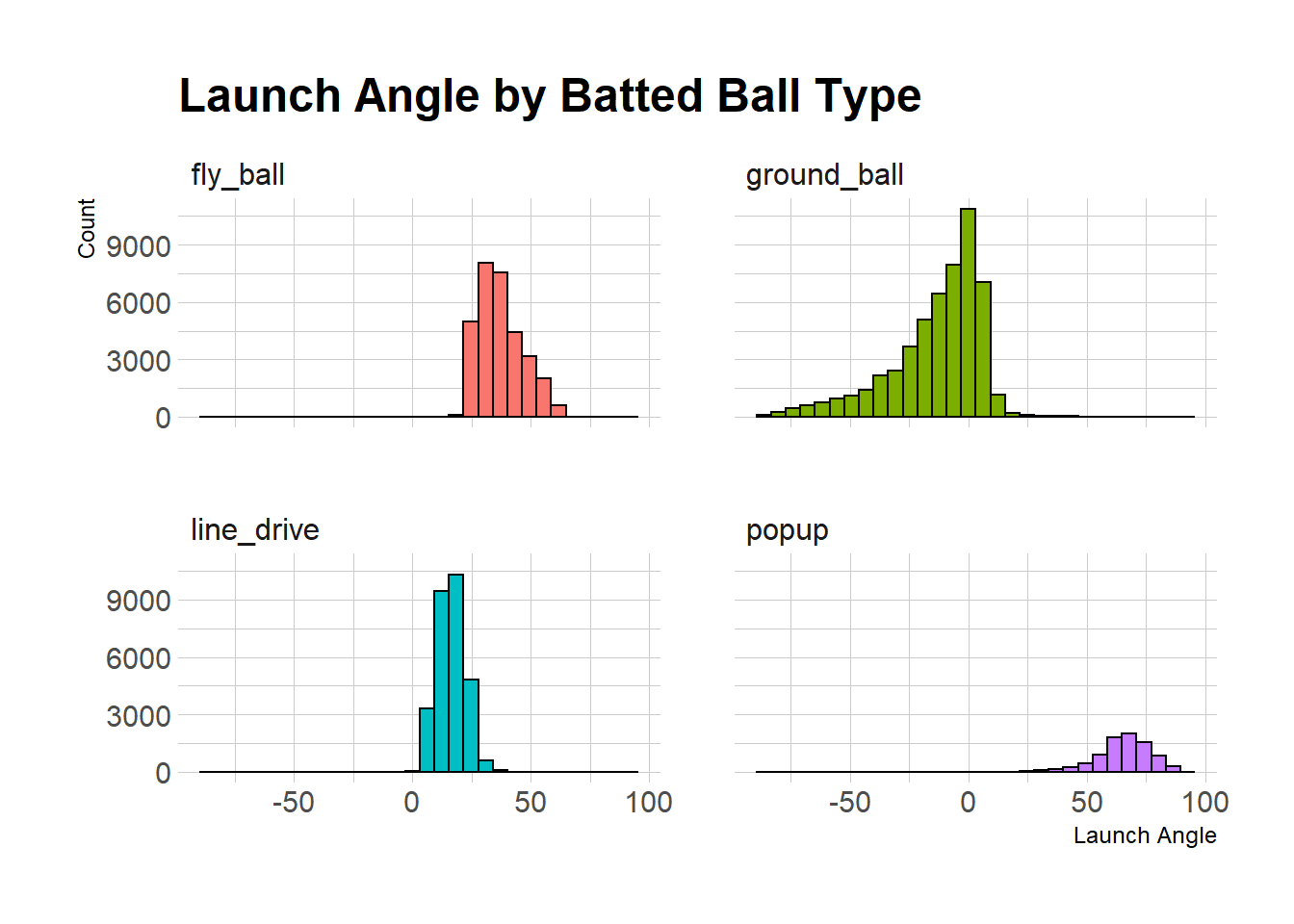
The first visual highlights the varying degrees each type of batted ball are hit at. Each type has their own unique range which could be helpful in identifying whether a ball in play was a hit or not.
ggplot(newdat, aes(launch_speed, launch_angle))+
  geom_point(aes(fill = as.factor(hit)), color = 'black', shape = 21)+
  hrbrthemes::theme_ipsum_es()+
  theme(
    #legend.position = 'none'
  )+
  labs(title = 'Launch Angle + Exit Velocity',
       x = 'Exit Velocity',
       y = 'Launch Angle',
fill = '') 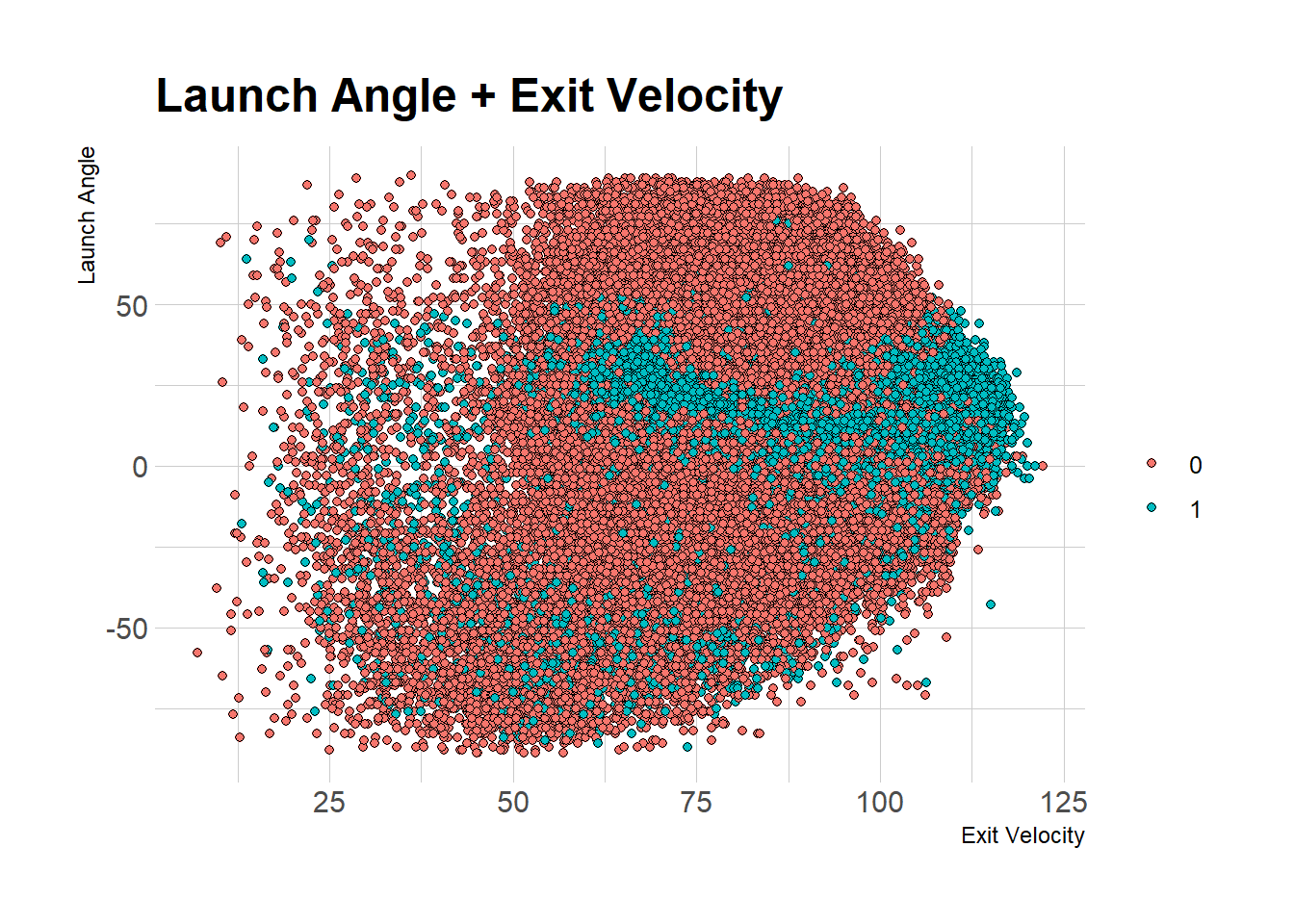
This graph shows the relationship between Launch angle and exit velocity. You can get a hit with many combinations between launch angle/exit velocity but the highest concentration of hits relative to non hits has to be between the 0-50 degree range. Hitting the ball hard will also increase the chances of that ball falling for a hit as well.
However, a better visualization could feature barrels rather then whether the ball was a hit or not. MLB defines a barrel as any ball where all events of that particular hit type have a minimum .500 Batting Average and a 1.500 Slugging %. At a minimum, a barreled ball must have been hit atleast 98 mph with a launch angle between 26-30 degrees. As the harder the ball is hit the more the launch angle range can expand to be considered a barrel. Barrels are highlighted in the graph below:
ggplot(newdat, aes(launch_speed, launch_angle))+
  geom_point(aes(fill = as.factor(barrel)), color = 'black', shape = 21)+
  hrbrthemes::theme_ipsum_es()+
  theme(
    #legend.position = 'none'
  )+
  labs(title = 'Launch Angle + Exit Velocity',
       x = 'Exit Velocity',
       y = 'Launch Angle',
fill = '') 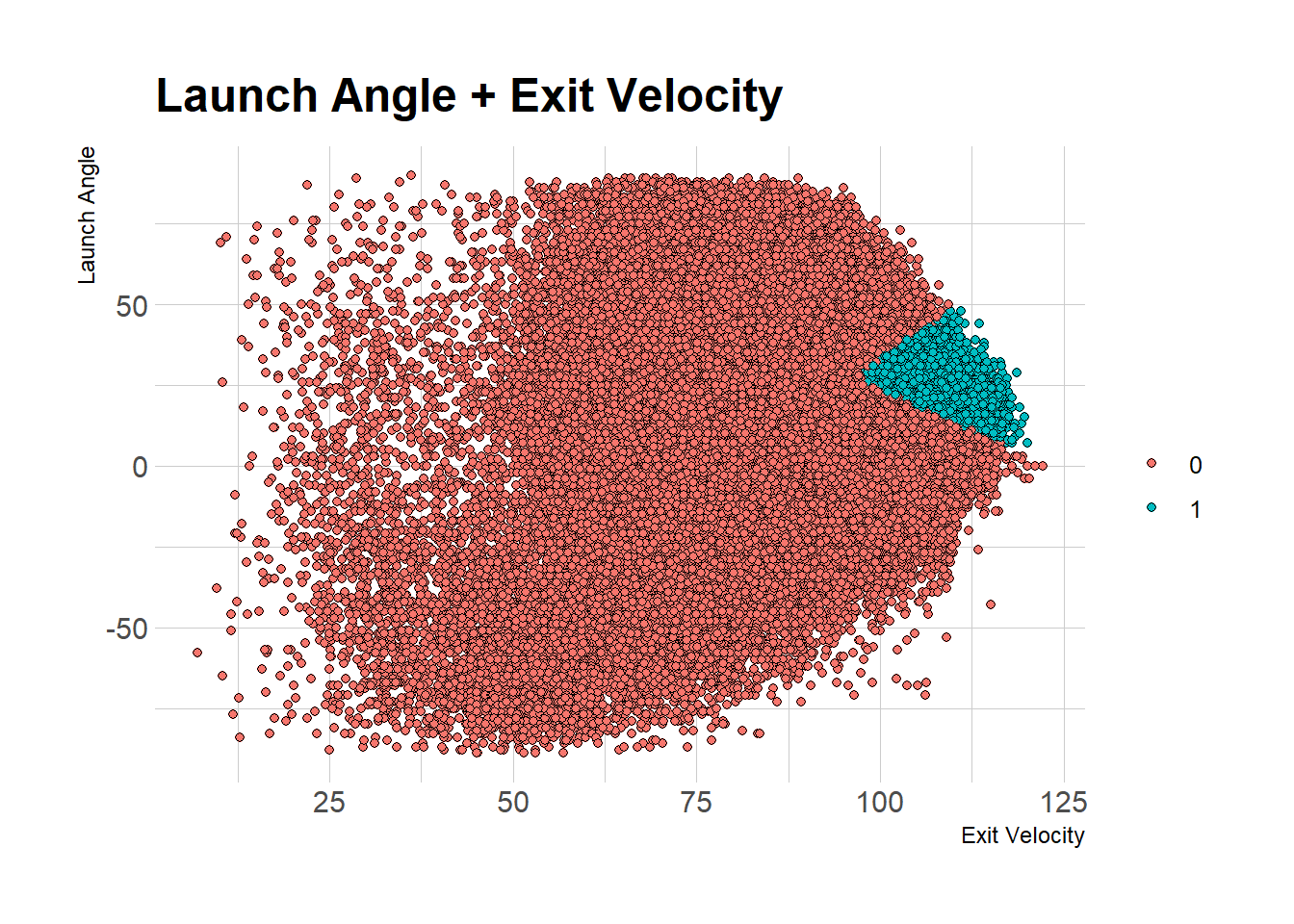
Barrels occupy a small but significant portion of the graph here ( 1 indicates barrel while 0 indicates no barrel). You can also see that as the ball get hits harder, the wider the launch angle the ball can be hit at to be considered a barrel. Also, based off of the first graph you can tell that the barrels typically fall within the line drive range with respect to batted ball type.
Exploring the data can allow you to visualize any potential relationships within your variables. You can start to think about what could be important within the model. Following the exploration we will seek to get into preparing our data.
Model Preparation
We will first create a recipe to help the data adjust to the requirements for the model:
newdat$hit <- as.factor(newdat$hit)


hit_recipe <- recipe(newdat) %>%
  update_role(all_nominal(), new_role = "id") %>%
  update_role(hit, new_role = "outcome") %>%
  update_role(all_numeric(), new_role = 'predictor')
The recipe will allow us to change the data for the model while not altering the main dataset. Before i start the recipe, i will use the as.factor function to change our response variable to a factor. This is important because the random forest model will not run unless the response variable is a factor.
We use the update_role() function to change any nominal (non numeric variables) variables to ‘id’, change our hit variable to an ‘outcome’, and the rest of the numeric variables to ‘predictor’.
id variables will not be considered within the model. When we supply the dataset to the model we don’t have to get rid of variables like player_name, game_date, and game_pk.
outcome is just telling the model that hit will be the response (dependent variable).
predictor is telling the model these variables will be used as the independent variable.
Note: you can create the dummy variables or change the hit column to a factor in the recipe should you choose too.
Data Split
set.seed(1234)

newdat_split <- initial_split(data = newdat, strata = hit, prop = 3/4)

train <- newdat_split %>%
  training()

test <- newdat_split %>%
  testing()
Since we will be running and testing our model on the same data, we will need to split it. I will be using a 75/25 split of the data (prop = 3/4), which means that 75% of the data will be used in training the model while the rest will be using in testing/evaluating the model. The strata is there to ensure we have the same proportion of hits in both the test and train data sets.
Model Building
The first step we have to do is build the model:
hit_random <- rand_forest(trees = 1000,
                          mtry = 8,
                          min_n = 8 )%>%
  set_engine('ranger', importance = "impurity") %>%
  set_mode('classification')
The first item we highlight is the type of model, and in this case we are using a random forest model. The engine we will be using is ‘ranger’ but you are able to use other engines as well. The mode will be ‘classification’ since we are attempting to predict probability of an event occurring.
In the following steps we will create the workflow that will combine the recipe and the model itself into one object. Then we can run the model by fitting the workflow to the training data:
hit_random_wf <- workflow() %>%
  add_recipe(hit_recipe) %>%
  add_model(hit_random)

hit_random_fit <- hit_random_wf %>%
  fit(data = newdat)
We will use the predict() function to fit the model on new data while selecting type = ‘prob’ to output probabilities rather than the predicted results (either a 1 or 0). Then we use bind_cols to add various columns so that we can identify each of the events uniquely. Finally the ifelse() statement will allow us to identify whether a ball would have predicted to have been a hit or not.
p_rand <- hit_random_fit  %>%
  predict(new_data = test, type = 'prob') %>%
  bind_cols(test %>%
              select(player_name,
                     game_date,
                     home_team,
                     hc_x,
                     hc_y,
                     hit
              )) %>%
  mutate( pred_hit = ifelse(.pred_1 >= .5, 1, 0),
          pred_hit = as.factor(pred_hit))


p_rand %>% head(5) %>%
knitr::kable()| .pred_0 | .pred_1 | player_name | game_date | home_team | hc_x | hc_y | hit | pred_hit |
|---|---|---|---|---|---|---|---|---|
| 0.0384464 | 0.9615536 | Chapman, Matt | 2021-04-07 | OAK | 84.50 | 31.31 | 1 | 1 |
| 0.9604995 | 0.0395005 | Rojas, Josh | 2021-04-07 | COL | 134.99 | 147.35 | 0 | 0 |
| 0.3545014 | 0.6454986 | Stanton, Giancarlo | 2021-04-07 | NYY | 118.54 | 137.36 | 1 | 1 |
| 0.6446790 | 0.3553210 | Astudillo, Willians | 2021-04-07 | DET | 128.96 | 127.39 | 0 | 0 |
| 0.1737906 | 0.8262094 | VanMeter, Josh | 2021-04-07 | COL | 174.35 | 91.21 | 1 | 1 |
Model Evaluation
Now that we used the model on new data lets evaluate the model. I will first be using the accuracy measure to determine how many correct predictions we got. I will be showing you how to obtain this value via base R and through tidymodels.
Tidymodels
met <- p_rand %>%
  metrics(truth = hit, estimate = pred_hit)

print(met)
## # A tibble: 2 x 3
## .metric .estimator .estimate
## <chr> <chr> <dbl>
## 1 accuracy binary 0.986
## 2 kap binary 0.969Base R
tab3 <- table(p_rand$hit, p_rand$pred_hit)

sum(diag(tab3))/sum(tab3)
## [1] 0.9864234Variable Importance
We can also check variable importance. We will use the VIP package for this. All we need is the fit object on the training data, following by the pull_workflow_fit() and then the vip() functions. We also choose to specify how many variables to output.
hit_random_fit %>%
  pull_workflow_fit() %>%
  vip(num_features = 20)
## Warning: `pull_workflow_fit()` was deprecated in workflows 0.2.3.
## Please use `extract_fit_parsnip()` instead.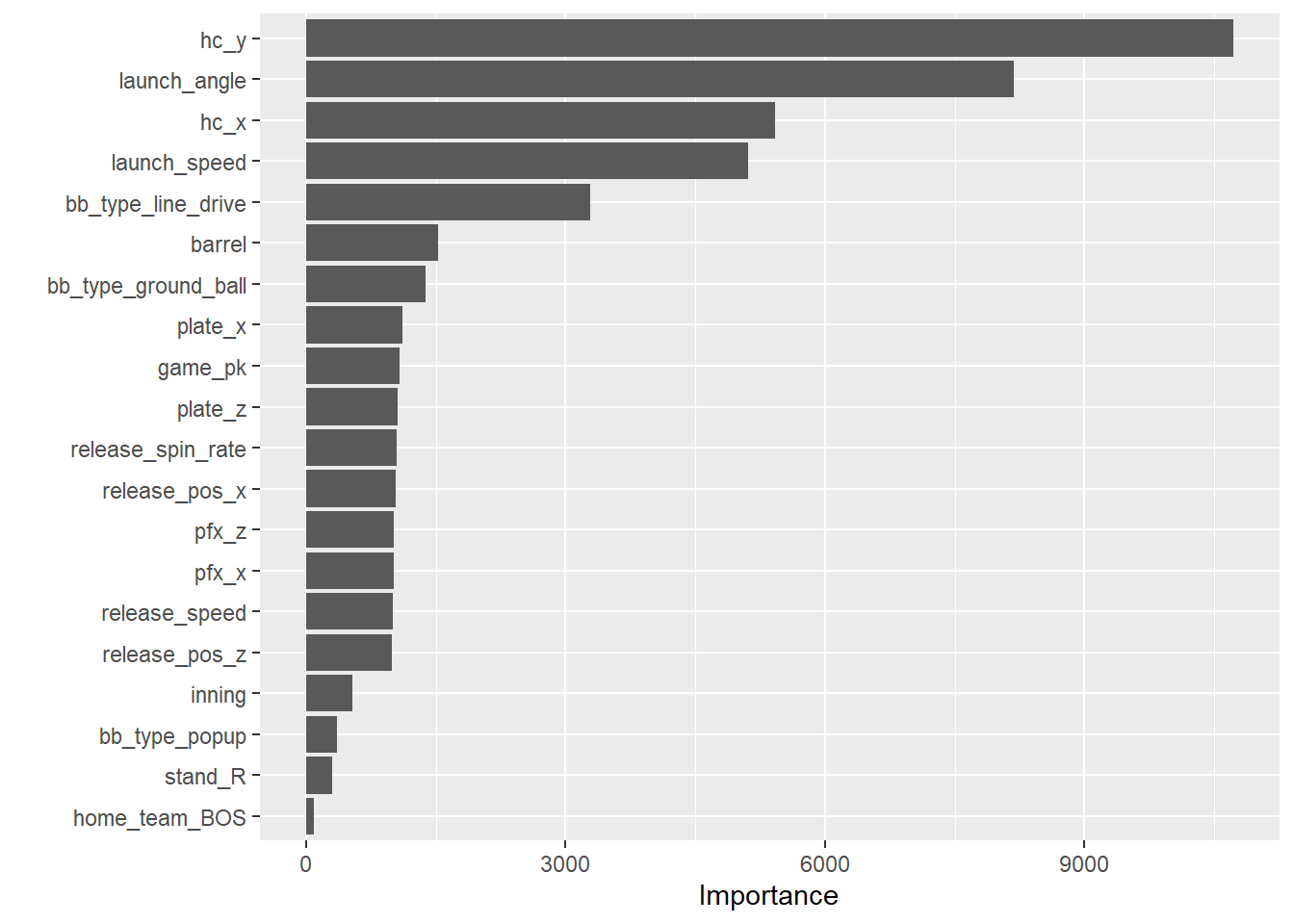
Hit Location appears to be the most important factor in determining a hit. This makes a lot of sense, given there are certain areas of the field that are left unoccupied on the field. Also launch speed and launch angle are important as well.
ROC Curve
Finally, we are able to plot an ROC curve using the ROCR package. ROC curve utilizes the True Positive Rate and False Positive Rate of the predictions. Therefore, we want the AUC (are under the curve) to be as big as possible.
ROCRpred <- prediction(as.numeric(p_rand$pred_hit), p_rand$hit)
ROCRperf <- performance(ROCRpred, 'tpr','fpr')
plot(ROCRperf, colorize = TRUE, text.adj = c(-0.2,1.7))
abline(a = 0, b = 1)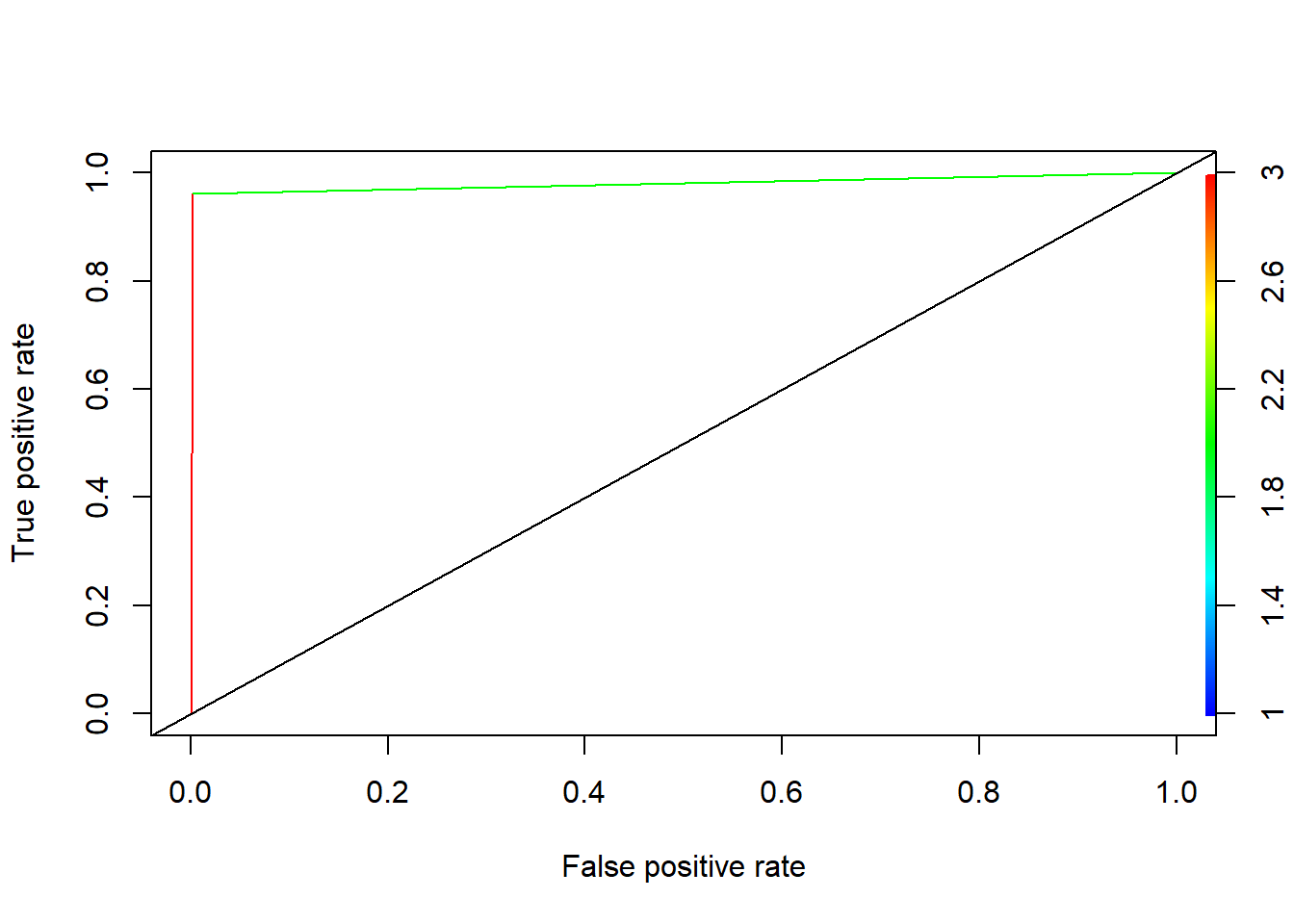
The graph suggests that this model can do a good job of distinguishing between classes ( hit or not a hit). We want the True Positive Rate to be as close to 1 as possible rather than the middle line. We also want the AUC as close to 1 as possible. For context, a 1 indicates 100% model accuracy while closer to 0 indicates the model is having trouble distinguishing between the classes. The AUC for this model is .876 which is very good.
Conclusion
This article sought to highlight how to create a model to predict whether a ball in play will be a hit or not. We found that hit location, Statcast variables like launch angle/Exit velocity and batted ball type are some of the most important variables that can predict whether a ball will be a hit or not.
That being said this model can be improved/expanded on. First of all we are using only one year of data. In 2021, MLB used 2 different baseballs during the 2021 season because of supply chain shortages due to the Covid-19 Pandemic. Now that wouldn’t be a problem except for the fact that one of the balls used was much more hitter friendly than the other. Now the effect of controlling for that may have little to no effect on the accuracy of the model but it still offer us some insight on its significance should we have an option to include it.